


Encrypted Security Camera Storage for Orange County Homes
Encryption alone doesn’t guarantee that a cloud provider can’t view your camera footage. With server-side encryption, a provider that manages the decryption keys may be able to access recordings. With end-to-end encryption, only authorized endpoints can decrypt them. For encrypted security camera storage in Orange County, who holds the keys matters as much as where footage is stored.
It’s reasonable to expect encrypted video to remain private, but the encryption method and access settings determine how that protection works in practice. Storage location, account permissions, and connected services also affect who can access recordings.
This guide explains who may access cloud footage, how cloud and local storage differ, and whether a locally recording camera needs an internet connection. You’ll also learn practical ways to limit unauthorized access, including how to manage passwords, two-factor authentication, updates, and extra copies of your footage. These considerations help you weigh privacy and access before deciding how your home cameras should store recordings.
Table of Contents
Can a cloud provider watch encrypted security camera footage?
Sometimes. It depends on who holds the decryption keys, how footage is recorded, and which services can access it. Compare the camera’s encryption and recording controls, not just its cloud storage label.
Remote Footage Access
Remote access lets an authorized user view live video or recorded clips through an app or web interface. With server-side encryption, a cloud provider that manages the keys may be able to decrypt stored footage. End-to-end encryption works differently: authorized endpoints decrypt video, while the service carrying or storing it cannot. Check whether the system supports remote viewing, who can sign in, and whether access can be shared or revoked.
Recording Styles and Storage Choices
Continuous recording captures video throughout the day, while scheduled recording limits it to selected hours. Event-based recording saves clips after motion or another trigger. Analytics-assisted recording uses camera analysis to identify activity, such as a person near an entry. Match the recording style to the incident you need to document: a short motion clip may miss what happened just before it.
Battery-powered cameras commonly use motion-triggered recording to conserve power. That can reduce unnecessary clips, but activity outside the camera’s trigger settings may not be recorded. Cloud plans for IP camera footage typically offer retention from 30 days to 365 days. Compare retention, recording mode, resolution, and the number of cameras when assessing usable capacity. More frequent or detailed recording can require more storage.
Encryption and Recording Rules
Encryption in transit protects video while it moves between a camera, app, and service. Encryption at rest protects recordings saved on a card, drive, or server, but provider-managed keys can still allow cloud access. AES-256 is used by encrypted wireless cameras, but that label alone doesn’t establish end-to-end encryption. Check whether encryption covers both storage and transmission, and who controls the keys.
For California homes, recording rules depend on factors such as camera placement, audio capture, and how footage is used. Keep cameras focused on areas relevant to home security, and treat audio recording as a separate privacy consideration. These distinctions help guide recording settings without assuming video and audio follow identical rules.
Provider Availability and Internet Outages
Which providers serve Anaheim, Irvine, and Santa Ana? Cloud access depends on the camera platform and its supported service, not the home’s city alone. Compare compatible platforms by recording options, retention, key management, and remote access. A camera recording locally may continue saving footage during an internet outage, but remote viewing and cloud uploads can be interrupted. Check the system’s local recording behavior and what happens to queued footage when the connection returns.
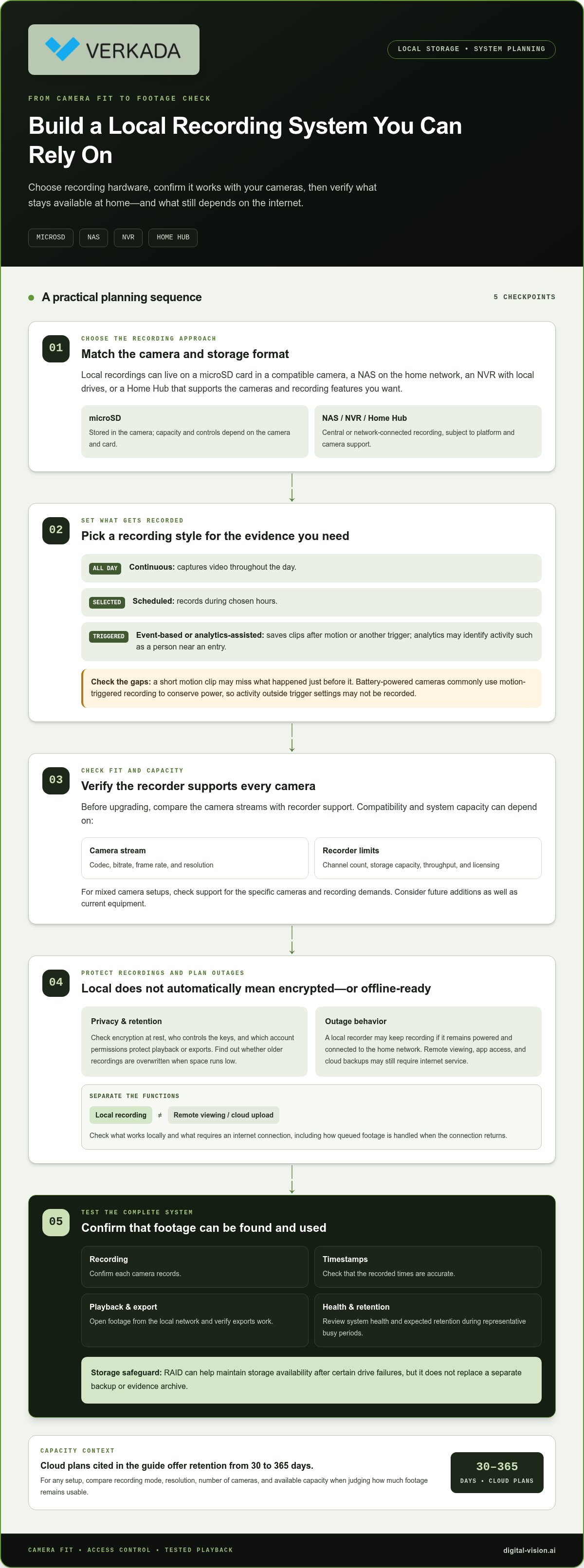
Local recording options, including microSD cards, NVRs, and Home Hub
In Orange County, local storage can mean a microSD card inside a camera, a network video recorder (NVR), a network-attached storage (NAS) device, or a home hub. These options keep recordings on hardware at home rather than relying only on cloud storage. Encrypted security camera storage in Orange County should suit homeowners’ coverage, privacy, and playback needs.
A microSD card stores recordings directly in a compatible camera. Its capacity and recording controls depend on the camera and card. A NAS stores footage on a device connected to the home network, while an NVR records camera streams to local drives. A Home Hub can act as a central recorder when its platform supports the cameras and desired recording features.
Local storage doesn’t automatically mean encrypted storage. Compare whether footage is encrypted at rest, who controls the encryption keys, and which account permissions protect playback or exports. Also learn whether the system overwrites older recordings when space runs low. These details shape both privacy and the likelihood that an important clip remains available.
A local recorder may continue recording during an internet outage if it remains powered and connected to the home network. App access, remote viewing, and cloud backups may still depend on internet service. Compare these functions separately. Identify what works locally and what requires an internet connection, so you know which features remain available during an outage.
Before upgrading, check whether the recorder supports each camera’s stream, codec, bitrate, frame rate, and resolution. Channel count, storage capacity, throughput, and licensing can also limit compatibility. A mixed camera setup may work only if the platform supports the specific cameras and recording demands. Consider future additions as well as current equipment when assessing system capacity.
After setup, test playback. Confirm that each camera records, timestamps are accurate, footage opens from the local network, and exports work. Review system health and expected retention during representative busy periods. RAID can help maintain storage availability after certain drive failures, but it doesn’t replace a separate backup or evidence archive.
For encrypted security camera storage Orange County residents can maintain as their needs change, align camera compatibility, recording hardware, and access requirements. Plan a local video surveillance system around the home’s network and storage goals.
Does local storage mean my camera works without the internet?
Local recording can continue during an internet outage if the camera and recorder remain powered and connected to the home network. Remote viewing, app alerts, and cloud uploads may stop until internet service returns. Test each function separately: confirm local playback, remote access, and alerts under normal conditions, then identify which depend on internet access.
Retention means how long recordings remain available before the system deletes or overwrites them. There’s no single retention period for every property. A home’s target depends on when residents might discover an incident, the recording schedule, camera count, resolution, frame rate, and available hardware capacity. Continuous recording uses storage differently from motion-triggered clips, while analytics settings can affect which events are saved.
Start planning with a practical question: how long might it take to notice a problem and review footage? Then compare that target with the system’s recording mode and usable storage. Capacity depends on resolution, codec, bitrate, frame rate, camera count, recorder limits, and drive configuration. Because changing one setting can affect retention, estimate capacity using the full camera setup, not drive size alone.
Published examples show how needs differ by property type. Many businesses, including hotels, retail stores, supermarkets, and construction companies, store footage for 30 to 90 days. Financial or healthcare institutions often retain video for 6 months to a year. Those periods aren’t universal home targets; they illustrate how operational needs and risk influence retention planning.
For a residence, identify the areas that need coverage, the recording schedule, and how quickly someone can review alerts. A camera covering an entry may need a different recording mode from one monitoring a rarely used side yard. Use these decisions to set a retention goal, then size storage around resolution, recording mode, and camera count. Revisit the plan after adding cameras or changing settings.
Deletion needs attention, too. Local systems may overwrite older footage when storage fills, so learn how replacement works and whether you can selectively delete recordings. A downloaded clip can remain on a phone after the camera’s recording history expires. If the phone’s photo library backs up automatically, that copy may also be stored elsewhere. Include exports and backups in your retention plan.
After setup, test playback and compare expected retention with actual recordings. Confirm timestamps, recording coverage, system health, and clip exports during representative busy periods. These checks help show whether the selected capacity and settings preserve the footage you need.
DIY versus professionally planned systems
A DIY camera can suit a small setup with straightforward coverage, such as one entry and a detached garage. A professionally planned system is useful when cameras, recording hardware, network capacity, and storage must work together. The choice is less about labels than how well the security camera system fits the property’s coverage and access needs.
For a simple DIY installation, map each camera’s field of view before mounting it. Check whether the planned view captures the approach to an entry, not only the doorway. Then test motion detection during daytime and nighttime conditions. A camera aimed at a busy street, for example, may trigger on passing activity and fill local storage with clips unrelated to the home.
Planning becomes more involved as the system grows. Camera compatibility can depend on stream format, codec, bitrate, frame rate, resolution, channel count, recorder throughput, storage, and licensing. A mix of cameras may not work simply because each connects to the same network. List the existing devices and desired additions before selecting a recorder or platform.
Use this practical comparison before deciding:
Coverage: Identify entrances, walkways, and other areas that need surveillance, then note blind spots.
Recording: Choose continuous, scheduled, or motion-based recording according to what an incident review needs to show.
Storage: Set a retention target and account for camera resolution, recording mode, and future expansion.
Access: Decide who needs live viewing, playback, exports, or permission to manage the system.
Resilience: Separate local recording from backup planning, since a second copy needs its own access and deletion controls.
A professional plan can help coordinate these elements across multiple cameras or connected systems. For example, adding a camera to an existing recorder may affect available channels, network throughput, and usable retention. Integration with access control can also shape which views or events are useful when reviewing an entry. Planning these relationships first helps ensure a hardware upgrade addresses more than one part of the system.
Whichever route you choose, test the completed installation rather than relying on a live camera view alone. Confirm recording, playback, timestamps, exports, system health, and expected retention. Review footage in representative lighting and activity conditions, then adjust motion zones or recording schedules. Also check the update support period for the exact camera model and keep the app, camera, and router current.
DIY works best when setup, compatibility, and ongoing checks are manageable for the homeowner. Professional planning is a practical fit when coverage, storage, integration, or troubleshooting spans multiple components. A clear list of locations, users, recording needs, and backup expectations makes either approach more precise.
Reducing unauthorized access to camera footage
Secure camera storage by protecting recordings, the accounts that control them, and every place copies may remain. A strong app password helps, but it doesn’t necessarily encrypt video stored on a camera, recorder, or phone. For encrypted security camera storage in Orange County, plan for both account access and the devices holding footage.
Set up encrypted storage by confirming protection in transit and at rest, identifying who controls the decryption keys, restricting sharing permissions, and securing each account. Use a unique password, enable two-factor authentication when available, and keep the camera, app, and router updated. These steps provide a practical baseline for a home camera system.
The FTC recommends comparing camera sharing permissions. Review each user’s access to live viewing, playback, exports, and system settings. Remove permissions when someone no longer needs them, and avoid shared logins when separate accounts are available. For example, a household member who only views live video may not need permission to export or delete recordings.
Encryption requires a closer look than a feature label. Encryption in transit protects footage as it moves between devices and services. Encryption at rest protects stored recordings, but a cloud provider managing the keys may still access them. End-to-end encryption limits decryption to authorized endpoints, not the service carrying or storing the video.
Protect the network as well as camera accounts. A router compromise doesn’t automatically provide camera credentials, but it can expose connected devices to additional risk. Keep router software current, use a strong router password, and consider whether a VPN can create a closed pathway between cameras and cloud services. Treat remote viewing as a separate access route.
Copies need their own controls. Local recording with cloud backup creates another archive to manage, including its permissions and deletion behavior. Check whether deleting a clip in the app also removes backup copies. A downloaded clip may remain in a phone’s photo library after the camera’s history expires, and phone backups may copy it elsewhere.
Plan deletion before an incident occurs. NIST’s consumer IoT baseline includes the ability to delete stored personal data or make it inaccessible. Test removing a sample clip from the app, local storage, cloud backup, and phone library. For encrypted security camera storage in Orange County homes, this review helps reveal where footage may remain.
For homes combining camera monitoring with controlled entry, coordinated camera and access system integration can help align viewing permissions across connected systems.
Digital-Vision.AI: Video Surveillance Systems
Digital-Vision.AI helps homeowners plan video surveillance around camera coverage, recording needs, and how footage will be reviewed. If you’re weighing local storage against cloud access, a coordinated system plan can connect those choices to how cameras operate across your property.
Its Video Surveillance Systems can be considered alongside Alarm Services and Access Control Solutions when these systems need to work together. Integration can align security components, while planning can account for camera placement, recording settings, and who needs access to footage. This is a practical next step when a setup has several cameras, evolving storage requirements, or connected entry systems.
For guidance on a home surveillance plan, contact Digital-Vision.AI.
Make Your Storage Plan Work for Your Home
Your camera setup should support how your household uses its spaces today and adapt as those needs change. Before making adjustments, identify who should be able to view footage, which areas matter most, and how the system should fit your everyday routines. These decisions give encrypted security camera storage in Orange County a clear purpose beyond simply saving video.
Digital-Vision.AI can help shape that plan through Video Surveillance Systems, with Alarm Services and Access Control Solutions available to complement the security design. The right next step is a conversation about your priorities, existing equipment, and how you want the system to function as a whole.
Contact Digital-Vision.AI about camera storage to discuss a considered approach for your home. With a clear plan, you can make informed choices and move forward with greater confidence.
Frequently Asked Questions
Is using local storage and cloud backup more private?
Not automatically. Local recording with cloud backup creates another copy and another access point to manage. For example, footage may remain in a cloud archive after someone deletes it from the camera app. Privacy depends on encryption, account permissions, key control, and how each copy is deleted. Inventory every storage location, including household phones that receive exported clips, before deciding whether the backup’s resilience justifies its added exposure.
Which Orange County security camera providers offer end-to-end encrypted cloud storage?
End-to-end encryption is a platform feature, not a guarantee tied to serving a particular Orange County city. The key distinction is whether only authorized devices hold decryption keys or the cloud service can access them. Compare the platform’s technical documentation and account controls for the camera system you’re considering. This article doesn’t provide a provider-by-provider list of end-to-end encrypted cloud services in Anaheim, Irvine, or Santa Ana.
How do encrypted cloud storage, local NVR storage, and hybrid camera storage compare?
Encrypted cloud storage supports remote access, but access depends on the platform’s account and key model. An NVR keeps recordings on a recorder at the property, making physical access to that hardware a separate consideration. Hybrid storage keeps local footage and a cloud copy, preserving access to another archive but creating additional copies to secure. Compare who can view, export, and delete recordings in each setup.
How long can businesses and homeowners retain security camera footage under California privacy laws?
There isn’t one retention period that applies to every property. Set a target based on why footage is collected, how long it may take to discover an incident, privacy considerations, contracts, insurance, applicable requirements, and available storage. A home documenting entry activity may have different needs from a business investigating an operational issue. Define the purpose first, then align recording settings and deletion practices with it.
What are the risks of cloud-stored security camera footage, including breaches and vendor access?
Cloud footage can be exposed through weak or reused account credentials, overly broad sharing, compromised accounts, or provider access when the provider controls encryption keys. Clips exported to phones or backup services create additional places to protect. A practical review should cover sign-in security, authorized users, key ownership, and deletion from both the camera platform and connected archives. These checks help identify access paths without assuming encryption removes every storage risk.
Are there local Orange County or California laws governing security camera recording and storage?
The article notes that California recording rules depend on camera placement, audio capture, and how footage is used. Keep cameras focused on areas relevant to home security, and treat audio recording as a separate privacy consideration.
What encryption standards do security camera storage providers use for video at rest and in transit?
AES-256 is used by encrypted wireless cameras. Encryption at rest protects saved recordings, while encryption in transit protects video as it moves between devices and services; provider-managed keys may still allow cloud access.


Comments